DMARC Monitoring & Report Analysis
Turn Raw DMARC XML Reports Into Actionable Insights
yourDMARC automatically ingests, parses, and visualizes your daily DMARC aggregate and forensic reports. Identify unauthorized senders, track compliance progress, and safely enforce p=reject — all from one dashboard.
- ✓Automated RUA & RUF report ingestion from all major ISPs
- ✓Real-time alerts for spoofing attempts and volume spikes
- ✓Safe path from p=none → p=quarantine → p=reject

See it in Action
How DMARC Monitoring Works
Go from zero visibility to full DMARC enforcement in three simple steps. No technical expertise required.


Need registrar-specific DNS instructions? Read our step-by-step DMARC Setup Guides.
Everything You Need for Complete Visibility
From raw XML ingestion to board-level compliance reports, yourDMARC covers the full monitoring lifecycle.

Automated XML Report Ingestion
No more manually inspecting raw XML files. Securely route your DMARC RUA and RUF reports to our ingestion engine. We parse thousands of daily reports from Google, Yahoo, Microsoft, and all major ISPs automatically.

Real-Time Dashboard & Charts
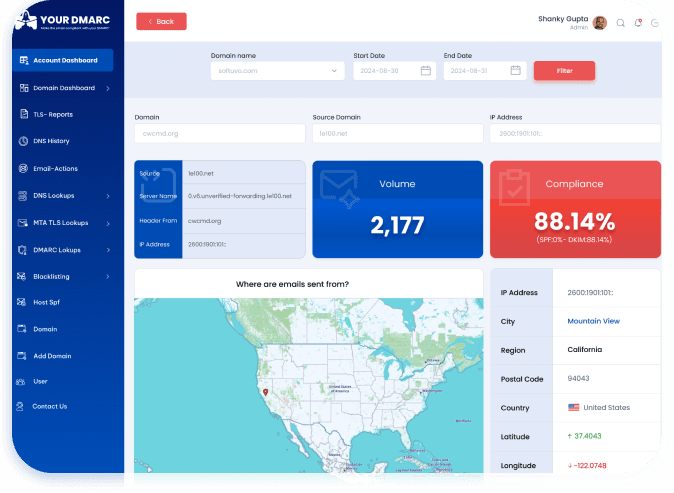
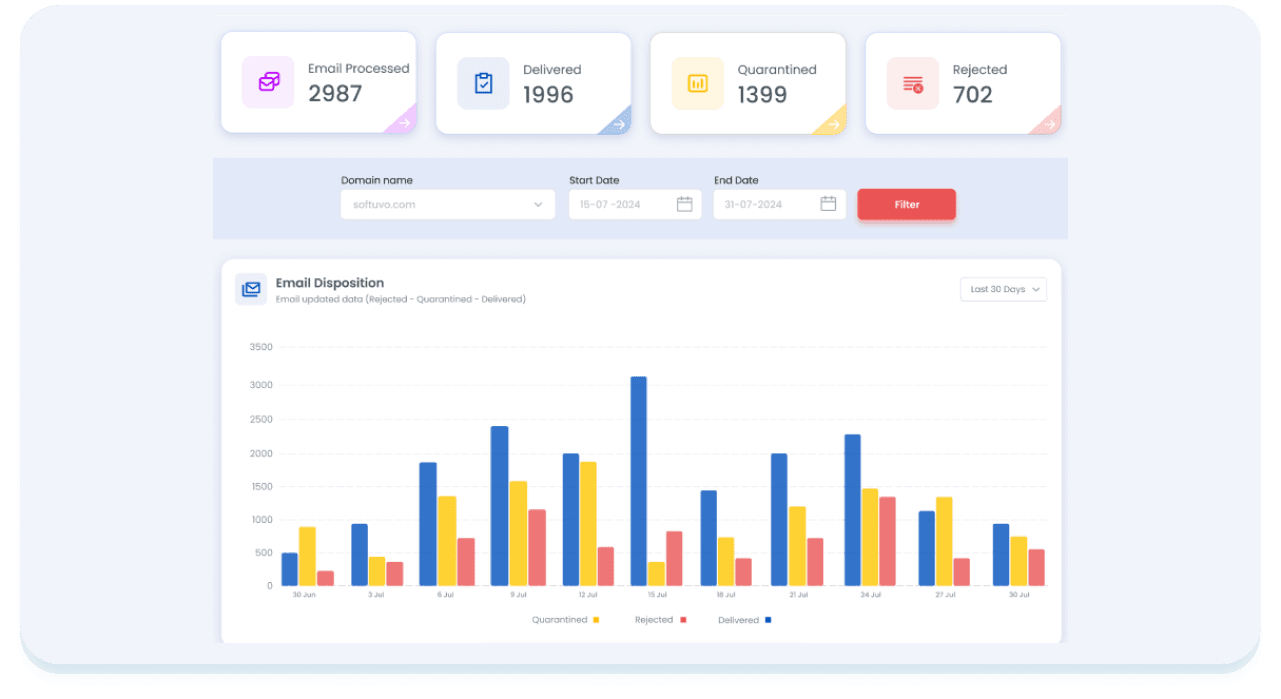
Analyze email traffic sources, geolocation volume maps, SPF/DKIM pass rates, and DMARC alignment scores in one intuitive dashboard. See volume trends, disposition breakdowns, and source reputation at a glance.

Smart Fail Alerting
Get instant email alerts when domain spoofing attempts or authentication failure spikes are detected. Configure thresholds, receive weekly PDF digest reports for your security team, and never miss a threat.

Sender Source Intelligence
Identify every service sending mail on your behalf — Mailchimp, Salesforce, Google Workspace, HubSpot, and more. See which sources pass authentication and which are unauthorized impersonators.

Compliance Scoring
Track your compliance journey from p=none to p=reject with automated scoring. Get step-by-step recommendations to authorize all legitimate senders and reach full enforcement without disrupting email delivery.

Multi-Domain Management
Monitor unlimited domains from a single pane of glass. Perfect for agencies, MSPs, and enterprises with complex sending infrastructures. Centralized reporting with per-domain drill-down capabilities.
Your Email Intelligence Command Center
The yourDMARC dashboard transforms thousands of XML data points into clean, actionable visualizations. See exactly who is sending email on your behalf, where they are sending from, and whether they are authenticated.

The Cost of Unmonitored DMARC
DMARC without monitoring is like a car alarm without a notification. You need visibility to act.

Stop Phishing & Spoofing
Identify every unauthorized sender abusing your domain name. Once all legitimate senders pass alignment, set p=reject to block 100% of impersonation attempts.

Protect Brand Reputation
Phishing emails sent from your domain name damage customer trust irreversibly. Monitoring gives you the evidence to act before reputational harm occurs.

Meet Industry Mandates
Google, Yahoo, PCI DSS v4.0, and HIPAA all require DMARC monitoring. Our platform generates the audit-ready reports your compliance team needs.

Improve Inbox Delivery
ISPs reward authenticated senders with better inbox placement. Monitor your SPF, DKIM, and DMARC pass rates to ensure every legitimate email lands in the inbox.
Your Path to Full DMARC Enforcement
Monitor, analyze, and safely advance through each policy stage
p=noneCollect reports without affecting delivery
p=quarantineMove failing mail to spam folder
p=rejectBlock all unauthenticated mail entirely
DMARC Monitoring — Frequently Asked Questions
Expert answers to the most common questions about DMARC report parsing, ingestion, and policy enforcement.

Schedule a Demo
Discover more about yourDMARC and book a demo with sales.


Choose the Right Plan
Explore our flexible plans and pricing for perfectly fit solutions.

Learn more
Explore our latest blogs for expert insights on email spoofing prevention.
Download to read the eBook
