

Let’s be honest—phishing isn’t new. But the way attackers are launching these attacks in 2025? That’s where things are getting dangerously creative. If you're part of a university IT team, staff, or even just a student who’s been puzzled by a suspicious email from the “Admin Office,” this one's for you.
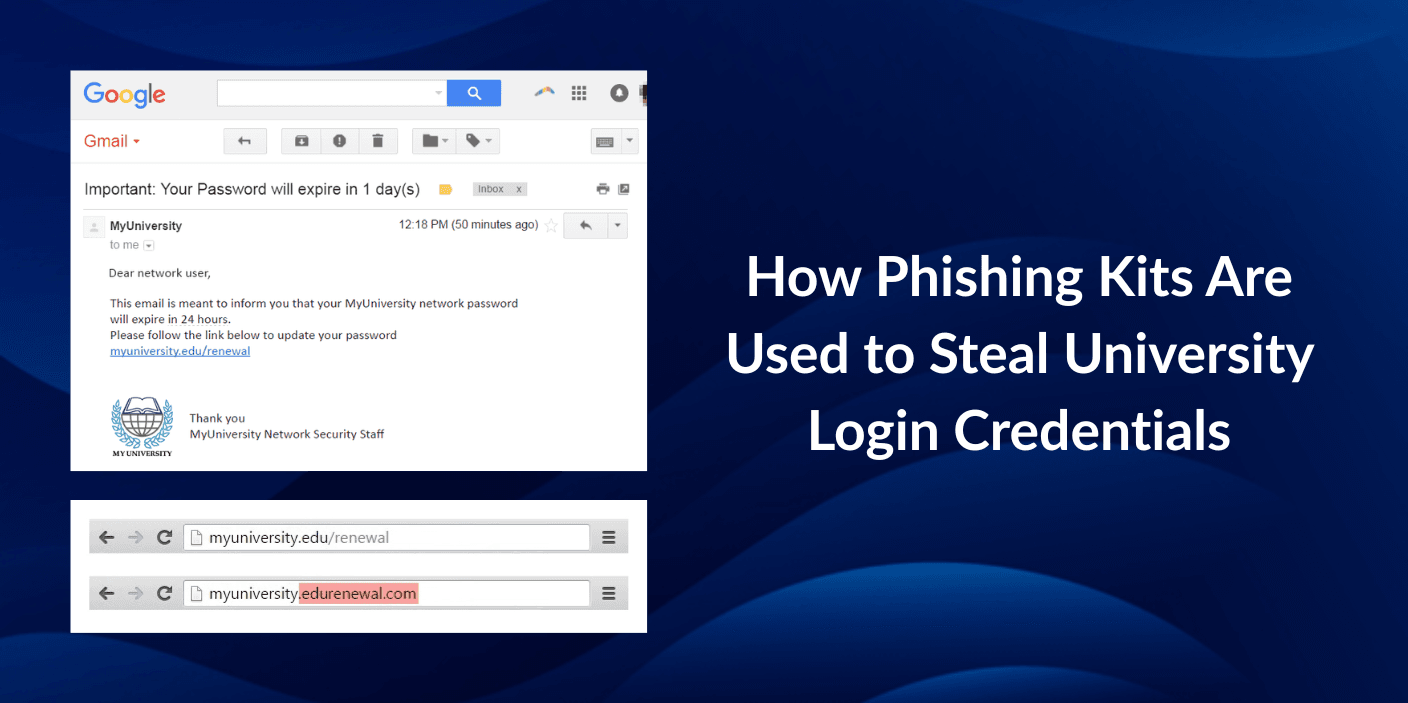
Phishing has become smarter, more automated, and unfortunately, more convincing. One of the main weapons in a cyberattacker's arsenal today is something called a phishing kit. In this blog, we’ll break down:
- What phishing kits are
- Why universities are being targeted
- How phishing kits are stealing login credentials
- Real-life examples
- What your university (or you) can do about it
Let’s dive in.
🧰 What is a Phishing Kit, Anyway?
A phishing kit is basically a ready-to-use set of tools created by cybercriminals to launch phishing attacks. Think of it as a plug-and-play website template—but instead of helping someone create a blog, it helps someone steal your login details.
Here’s what a basic phishing kit includes:
- A fake login page (usually mimicking real university portals)
- Scripts to capture login data
- Email templates to lure victims
- A backend dashboard to track stolen credentials
The craziest part? These kits are being sold (or sometimes shared for free) on the dark web. Even attackers with zero coding skills can deploy one.
🎯 Why Universities Are Prime Targets in 2025
You might wonder—why universities? Well, here's why they're getting hit hard in 2025:
1. High Volume of Users
Students, professors, admin staff—all with active university email accounts. That’s a goldmine.
2. Ouated Infrastructure
Some universities still run legacy systems or don’t enforce strong 2FA (two-factor authentication). Attackers know this.
3. Access to Valuable Data
Student records, financial info, academic research, even government-funded projects—once credentials are stolen, attackers can dig deep.
4. Easily Fooled Demographics
Let’s be real—students are busy, sometimes distracted, and maybe not super cautious. One well-designed fake login page is often all it takes.
🔍 How Phishing Kits Steal University Login Credentials
Here’s a step-by-step breakdown of how it usually plays out:
1. Reconnaissance
Attackers often start by researching the university. They’ll find out what the login portal looks like, the email structure of staff and students, upcoming events (e.g. exam season), etc.
2. Phishing Kit Customization
They then tweak their phishing kit to mimic the university's login page down to the pixel. Often the URLs will look like:
arduinoCopyEdithttps://login-universityname.com.secureverify.xyz
3. Mass Phishing Campaign
They send mass emails with subjects like:
- "IMPORTANT: Password Expiry Notification"
- "URGENT: Your Campus Account Has Been Suspended"
- "Final Exam Schedule Released – Please Log In"
These look eerily similar to official university communications.
4. Credential Harvesting
The victim clicks, lands on the fake login page, enters their details—and boom. The kit sends the login and password to the attacker’s dashboard, usually in real time.
5. Login to Real Systems
Armed with the stolen credentials, attackers log in to the real university systems. From there, they can:
- Steal personal data
- Access course material or grades
- Launch further attacks internally
- Attempt financial fraud (e.g. student aid access)
🧠 Real-World Example: University of Springfield (2025 Case Study)
In February 2025, the University of Springfield reported a breach affecting over 12,000 student accounts. The attack started with a phishing email spoofed to look like it came from the registrar’s office, asking students to “verify their course registration.”
The phishing kit was shockingly accurate—it cloned the university portal completely. Students were directed to a page that looked identical to the real one. Once they entered their credentials, the attackers didn’t just steal login info—they set up email forwards, changed passwords, and used the accounts to launch further phishing attacks to faculty members.
The incident led to:
- A week-long system outage
- Re-issuance of student IDs
- Mandatory password resets for all users
- Increased cybersecurity funding (finally)
🛡️ What Can Universities Do to Protect Themselves?
Alright, it’s not all doom and gloom. There’s plenty that can be done—and should be done—now.
✅ 1. Enforce 2FA on Everything
Two-factor authentication significantly reduces the chances of unauthorized logins. Even if credentials are stolen, attackers can't get in without the second factor.
✅ 2. Train Staff and Students Regularly
Email awareness training doesn’t have to be boring. Interactive, scenario-based sessions can help students spot red flags in phishing emails.
✅ 3. Use DMARC, SPF, and DKIM
These email authentication protocols help prevent spoofed emails from reaching inboxes. If you’re not using these, start today.
✅ 4. Monitor and Respond Fast
Set up systems that monitor for login attempts from unusual IPs or impossible travel scenarios (e.g. logging in from New York and then China 5 minutes later).
✅ 5. Report and Take Down Fake Sites
Work with security vendors or report phishing sites to takedown services. The faster you get a fake site offline, the fewer users will fall for it.
🧰 Tools That Can Help
If you're managing email compliance or IT security at a university, consider integrating tools that offer:
- Real-time phishing detection
- Credential leak monitoring
- Dark web surveillance
- Security awareness dashboards
Many modern platforms (like what your product may offer) combine all of this in a user-friendly interface, helping institutions stay one step ahead.
📣 A Word to Students and Faculty
Hey students, staff, and professors—you’re the first line of defense. Here's your quick checklist:
- Don’t click on suspicious links (even if it looks official).
- Always double-check the URL before logging in.
- If an email feels urgent or threatening, pause—phishing relies on panic.
- Report anything weird to your IT team.
🧩 Final Thoughts
Phishing kits are like phishing on steroids. They’ve made it possible for nearly anyone to launch sophisticated attacks with minimal effort. And in 2025, universities are unfortunately in the crosshairs.
But with better awareness, smarter tools, and a proactive approach, these threats can be managed—and even prevented.
Your email security isn’t just an IT issue—it’s a campus-wide responsibility.
📌 Want help protecting your institution from phishing attacks in 2025? Check out our email compliance platform, or reach out to our support team—we're always here to help keep your digital campus safe.
















