One CNAME. No more DMARC DNS edits.
Hosted DMARC: publish one CNAME, change your policy with a click
Hosted DMARC moves your DMARC record out of your DNS and into yourDMARC. You publish a single CNAME at _dmarc.yourdomain.com; we publish and serve the record it points to. Every later change, from p=none to quarantine to reject, pct, subdomain policy and reporting addresses, is a setting in the app, validated before it goes live and reversible with one click.
- ✓Switching changes nothing: the hosted record starts as a copy of your live one
- ✓Apply the recommended next step with a button, or turn on autopilot
- ✓Full history and one-click rollback for every change

Included on every plan. See pricing.
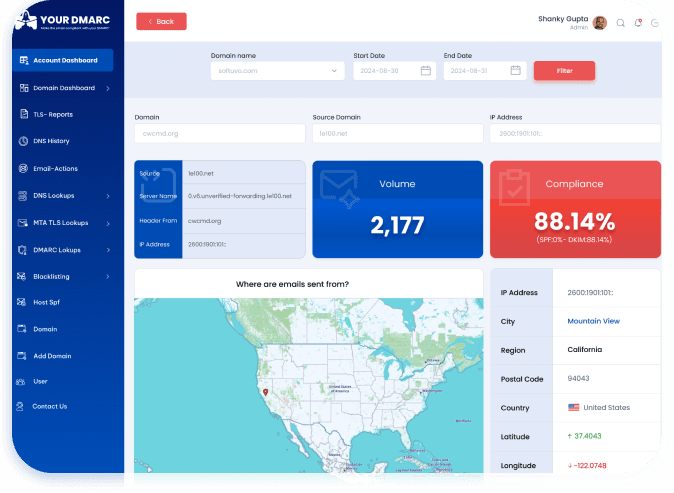
See it in Action
What is hosted DMARC?
A DMARC policy lives in a TXT record at _dmarc.<domain>. Normally you edit that record yourself, at your DNS host, every time the policy changes. With hosted DMARC the record at _dmarc is a CNAME that points at a hostname we publish for your domain, and the real TXT record lives there. Receivers follow the CNAME as part of their normal lookup and read the policy we serve.
The result: one DNS change, made once. After that your policy is a row in our database that we publish for you, change when you ask, and keep in sync.
_dmarc.yourdomain.com.  CNAME  <id>.dmarc.yourdmarc.com.

; served at that hostname, managed in yourDMARC:
v=DMARC1; p=quarantine; sp=reject; pct=100; rua=mailto:<you>@mail.yourdmarc.online
What you control from the app
- ✓
p=Policy for the domain: none, quarantine or reject. - ✓
sp=Policy for subdomains, so a weaker sp= cannot leave them open. - ✓
np=Policy for non-existent subdomains, which DMARCbis adds. - ✓
pct=The share of failing mail the policy applies to, to ramp up gradually. - ✓
adkim / aspf=Relaxed or strict alignment for DKIM and SPF. - ✓
rua / ruf=Our reporting address is always present; addresses for another vendor are kept, so running two tools in parallel keeps working.
How hosted DMARC works
Three steps, one DNS change. The policy you publish today is the policy receivers see after the switch.


The domain page shows the delegation status at all times: waiting for your CNAME, active, or CNAME removed. A Check now button re-reads DNS on demand.
Step up to quarantine and reject, with safety gates
Because we publish the record, we can also change it for you. For each hosted domain yourDMARC already works out the next step from your reports: fix failing senders first, raise pct, ready for p=quarantine, ready for p=reject. With hosting on, that recommendation gets an Apply button. Autopilot goes one step further.
- →Opt-in, per domain, with a target. Choose p=quarantine or p=reject as the furthest autopilot may go.
- →One level at a time. A step is taken only after the domain has been rated ready for a soak period, so a good week is not enough.
- →Steps back by itself. If your own mail starts failing after a step, autopilot lowers the policy again.
- →Emails you about every change, and every change is in the history with a one-click rollback.

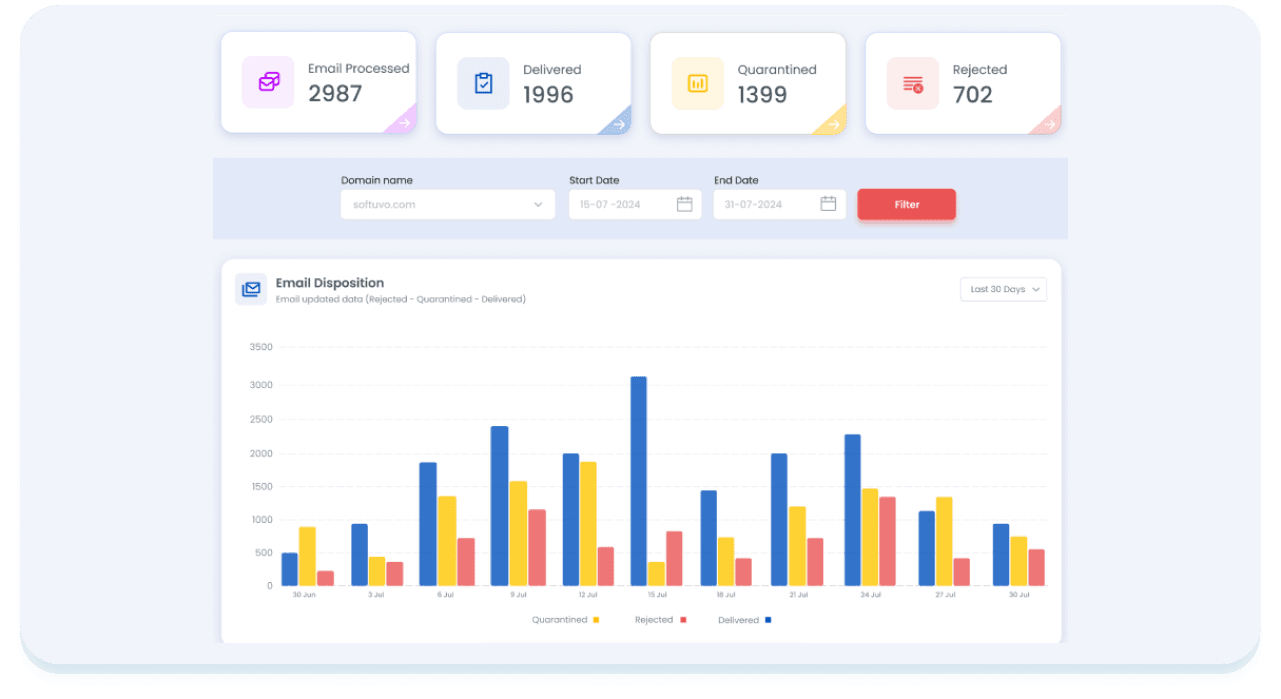
Built so that hosting can never make things worse
Delegating your DMARC record is a trust decision. These are the rules the hosted record follows.
Switching changes nothing
The hosted record starts as a copy of the record you already publish. The CNAME swap is invisible to receivers; policy changes come afterwards, as separate, deliberate steps.
Published before you are asked to point at it
The TXT record on our side is written before the CNAME is shown to you, so there is never a moment where _dmarc points at nothing.
Only valid records are hosted
A record we would not publish by hand, we do not host: one v=DMARC1, a valid p=, sp= and np=, pct between 0 and 100, our reporting address present, long records split correctly.
Every change is a history row
Who changed what, when, from what to what, and why: a manual edit, a recommended step, autopilot or a re-sync. One click restores any earlier version.
Drift is repaired daily
Our database is the source of truth and the published record is a projection of it. A daily job rewrites the published record if it drifts and checks that your CNAME still points at us, flagging it if it was removed.
Turning it off is safe too
Replace the CNAME with a TXT record whenever you like. We keep serving your policy until you do. If an account lapses we keep serving the last policy and only drop our reporting address after a grace period; the record is never deleted, because a domain with no DMARC record is spoofable.
Who hosted DMARC is built for
MSPs and agencies with many client domains
Every policy change across a client base is a click in one account rather than a ticket to each client's DNS host. Changes are logged with the user who made them, which is the audit trail clients ask for.
MSP partner program →Teams without direct DNS access
When DNS belongs to another department, an outside web agency or a registrar panel nobody wants to touch, you ask for one CNAME once. Enforcement afterwards does not depend on anyone else's change window.
How staged enforcement works →Anyone who wants enforcement on autopilot
Hosted DMARC is what makes a one-click Apply, and an opt-in autopilot that raises the policy for you, possible. You cannot automate a record you do not publish.
DMARC monitoring →Hosted DMARC vs a TXT record you manage yourself
Both publish a valid DMARC policy. The difference is what every change afterwards costs.
| Self-managed TXT record | Hosted DMARC | |
|---|---|---|
| Changing the policy | Edit the TXT record at your DNS host, by hand, for every step and every domain. | Change a setting in yourDMARC; receivers see it within minutes. |
| Who needs DNS access | Whoever changes the policy, every time. | Once, for one CNAME. After that, nobody. |
| Mistakes | A typo or a second _dmarc record silently disables DMARC; a weaker sp= goes unnoticed. | Records are validated before they are published; the editor only offers valid values. |
| History and rollback | Whatever your DNS host keeps, often nothing. | Every version with who, when and why; one-click restore. |
| Applying the recommended next step | Copy the record from the dashboard, paste it into DNS. | Press Apply, or let autopilot do it when the domain has been ready long enough. |
| Reports | Reports go wherever rua= points. | Our reporting address is always present; another vendor's address is kept if you have one. |
Hosted SPF, hosted MTA-STS and hosted BIMI
Hosted DMARC is one of a family. Each works the same way: one CNAME in your DNS, the record published and kept current by yourDMARC.
Hosted SPF
SPF allows at most 10 DNS lookups, and every include: for a sending service eats into that budget; one too many and SPF fails for every message. With hosted SPF your published record points at one record we host. You pick the services that send as you from a sender library, watch the lookup count before you publish, and hosted SPF flattens the record back under the limit when the includes would exceed it. Adding or removing a service never means another DNS edit.
Hosted MTA-STS and TLS-RPT
MTA-STS makes other mail servers use encrypted, verified connections when they deliver to you. It needs an HTTPS policy file with a valid certificate, a _mta-sts record whose id changes with every policy change, and a TLS-RPT record to receive reports. You publish three CNAMEs; we host the policy and its certificate, start in testing mode, can switch to enforce after a clean week of TLS reports, and step back to testing if your mail servers start failing TLS. Your MX list is kept in step with DNS, and you are warned before an MX certificate expires.
Hosted BIMI
BIMI shows your logo next to your mail in supporting inboxes, and it only works once DMARC is at quarantine or reject. Upload your logo, add one CNAME, and we publish the BIMI record and serve the logo file for you, checking the DMARC prerequisites first. Yahoo and some others show a hosted logo on its own; Gmail and Apple Mail also need a mark certificate (VMC or CMC). We do not sell certificates, but we help you choose one and attach it to the record. Available on plans that include BIMI.
BIMI →Hosted DMARC questions
What is hosted DMARC?
Hosted DMARC means your DMARC record is published by a provider instead of as a TXT record in your own DNS. You add one CNAME at _dmarc.<your domain> pointing at a hostname yourDMARC publishes for that domain. Receivers follow the CNAME and read the DMARC policy there. From then on the policy, pct, subdomain policy and alignment settings are changed in yourDMARC rather than in DNS.
Does switching to hosted DMARC change how my mail is treated?
No. When you turn hosting on, the hosted record starts as a copy of the record you already publish, with our reporting address added if it was missing. The CNAME swap is therefore invisible to receivers. Moving to quarantine or reject is a separate step you take afterwards, or let autopilot take.
Can a CNAME at _dmarc coexist with my existing TXT record?
No. DNS does not allow a CNAME beside any other record at the same name, so you delete the existing _dmarc TXT record and add the CNAME. We publish the hosted record before showing you the CNAME, so there is no gap: the moment your CNAME resolves, receivers read the same policy they read before.
Do receivers accept a DMARC record reached through a CNAME?
Yes. Receivers look up the TXT record at _dmarc.<domain> and a resolver follows a CNAME as part of that lookup, which is how DMARC reporting-address authorisation and many hosted DNS services already work. Our own domain verification follows the CNAME too, so the domain stays verified.
What is autopilot and how does it stay safe?
Autopilot is an opt-in setting per hosted domain with a target of p=quarantine or p=reject. It raises the policy one level at a time, and only once the domain has been rated ready for a soak period: enough reported mail, and the share of failing mail from senders that may be yours under the threshold. It steps back by itself if your own mail starts failing, and emails you about every change. You can turn it off or roll back at any time.
What happens if I stop using yourDMARC?
Replace the CNAME with a TXT record of your own and the delegation ends. Until you do, we keep serving your last policy. If an account lapses we keep serving the policy and drop our reporting address after a grace period, with an email telling you to move off. We never delete the hosted record, because a domain whose _dmarc points at nothing has no DMARC at all.
Which plans include hosted DMARC?
Hosted DMARC is available on every plan, the same as hosted SPF. Hosted BIMI depends on the plan. Domain and volume limits per plan are on the pricing page; MSP and managed plans are quoted.
Is hosted DMARC the same as managed DMARC?
No. Hosted DMARC is a publishing mechanism: we publish the record, you (or autopilot) decide the policy. Managed DMARC is a service where our team does the sender discovery, SPF and DKIM fixes and staged enforcement for you. Managed customers typically use hosted DMARC, but you can use hosted DMARC entirely on your own.
Not sure where your domain stands today? Run the free domain scanner or the sender requirements check.
Publish one CNAME and stop editing DMARC by hand
Create an account, add your domain and choose Hosted DMARC. The record you publish today carries over unchanged; every change after that is a click.

Schedule a Demo
Discover more about yourDMARC and book a demo with sales.


Choose the Right Plan
Explore our flexible plans and pricing for perfectly fit solutions.

Learn more
Explore our latest blogs for expert insights on email spoofing prevention.

As a global team, we’re always available. Let’s talk!


© 2026 yourDMARC

Download to read the eBook
